
Smolpad for iPhone Duo & Updates
Hey everybody! Apple's iPhone Duo released today, October 23, and Smolpad is ready! If you're on Version 1.3.9, it will work on the new device.
 Open Duo, and your notes sit beside the one you're writing. Unfolded, you get the two columns you know from iPad: your note list on the left, the note on the right. Jump from the packing list to the grocery list without backing out of anything.
Additional New Features
Trash Folder for Notes
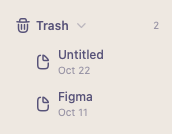
Deleting a note now moves it to the Trash folder inside of your Notes folder instead of erasing it. The Trash shows up under your folders whenever something is in it, with the day each note was deleted and where it came from. Touch and hold a note there to Restore it to its folder. It syncs to your other devices like everything else.
Note Edit History
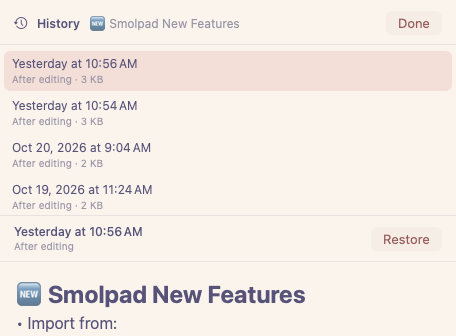
Wrote over a paragraph you meant to keep? Did a sync replace what you just wrote? Choose History on any note to see its earlier versions by date and time, read any of them, and restore the one you want. Restoring saves the current text as a version first, so you can always undo a restore.
Other New Features
We're always thinking of ways to improve the app, below are the additional new features included in 1.3.9 and a few from 1.3.8 too.
- Multi-select Notes! On MacOS, hold Cmd, click on multiple notes, and right click for actions. Or on iOS, tap Sort, then Select Notes, and you can move, export, or delete them in bulk.
- Manual Note Sync On iOS, pull down on the notes list and release to get the latest to your phone.
- Pixel Font Go retro with a new font in the editor, Tiny 5.
- Home screen widgets (Pro) Put a note on your Home Screen, or go with a Quick Action widget.
- An emoji picker - type a colon and a few letters, and find matching emojis.
- A slimmer note list - you can now turn off the last edited date in Settings. It will be off by default if it's your first time installing Smolpad.
- Emoji icons in the notes list - just start a new note with an emoji, and the list will use that as it's icon
Coming up!
In the next release, we plan to have multiple notepads (finally!) and the ability to use another folder on your Mac as the note source, yet have it stay in Sync with your phone. (Pro)
Smolpad Pro is $1.49 a month or $14.99 a year with the first week free.
Questions or Feedback? Always happy to help. https://feedback.smolpad.com/
Cheers! Gary @ Smolpad

