
Smolpad release: new Apple Watch app and pCloud support to sync your notes
Hey everybody. It has been a while since the last one of these, and Smolpad has had four releases in the meantime. The two from September are the big ones, so this issue is about those. 1.3.4 brought the note outline and thirteen new themes, and 1.3.5 put pictures in your notes; both are on the release notes page](https://smolpad.com/release-notes) if you missed them. Let’s dive into the new features!
1.3.7, out this week! 🎉
Tables
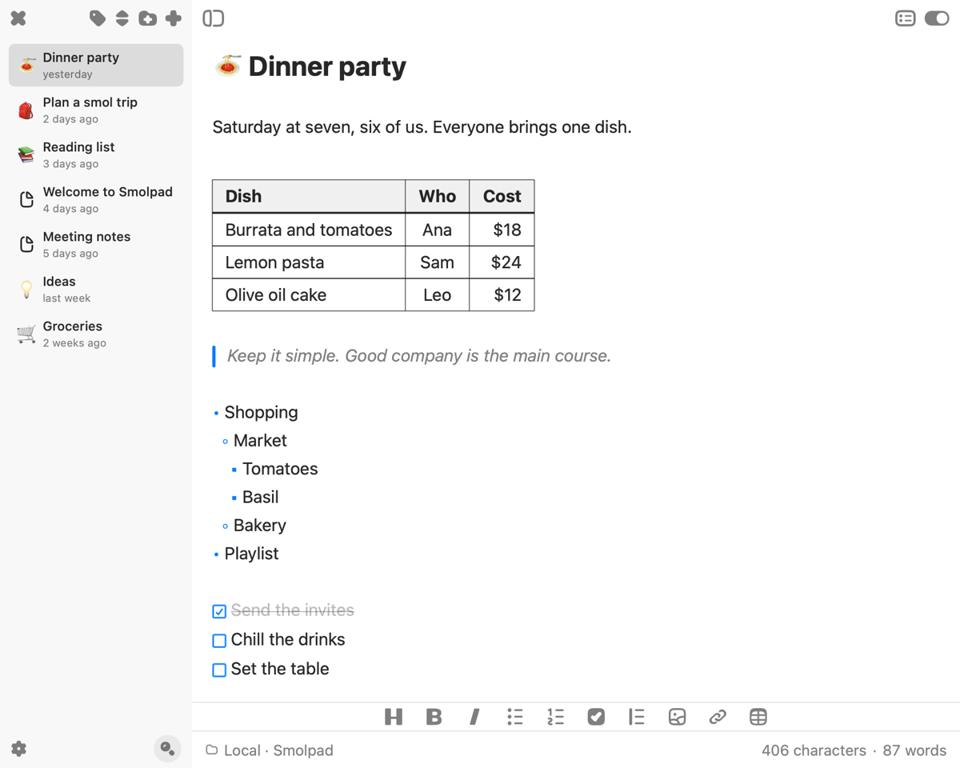
A Markdown table finally reads as a grid as you write, and a table pasted from a chat lines up on arrival. Tab moves between cells, Return adds a row, and there is a Table button on the formatting bar. With Hide Markdown syntax on it draws as a real table, in one of four styles. You can choose a style by going to Settings > Editor > Customize Editor. This was the most asked-for thing on the feedback board. Keep those suggestions coming!
Daily Notes
Turn on Daily note in Settings > General and Smolpad keeps one note per calendar day, named by its date in the format you pick. The note list gets a calendar: days with a note carry a dot, and tapping any day opens its note, past or future.
Shortcuts, Siri and Spotlight
Five actions work in the Shortcuts app with no setup, your notes show up in Spotlight, and with Apple Intelligence, Siri knows which note is on your screen.
Add to Today's Note from any app on the Mac. Select text anywhere and send it to today's note. In 1.3.6 that was an entry in the Services menu; 1.3.7 adds a keyboard shortcut, Control-Option-Command-T out of the box, and a notification that says what landed.
Settings Sync
Set up the daily note, your themes and the rest once, and every device on your iCloud account picks them up. Settings > General > Sync settings with iCloud turns it off.
Archive Notes
We’ve added the ability to archive notes instead of delete them. Right-click a note on the Mac, or touch and hold it on iPhone and iPad, choose Archive and it moves into an Archive folder. A swipe left can archive instead of delete, if you set it to do so in Settings.
More Markdown
Quotes with a bar in your accent color, nested bullets that look nested, footnotes, definition lists, ==highlights==, and code blocks colored in nine languages. Write [[Note title]] and it becomes a link that opens that note. Type :tent: and it becomes the ⛺ tent emoji, and a title that starts with an emoji shows it as the note's icon in the list.
More Themes
Two new themes: Doki Sayori and Doki Vanilla. Twenty-nine total now.
Bug Fixes
Under the hood, Smolpad now opens without freezing on a big library, and syncing no longer makes conflicted copies of your own edits after a dropped connection. When two devices truly clash, iCloud keeps both versions.
😎 New Pro Features
Smolpad on Apple Watch (Pro Feature)
Your notes on your wrist, in the same order as on your iPhone, with headings, lists and quotes intact. Check off a task and it is checked in the note. New Note starts one by dictation, Scribble or the keyboard, and Add Text puts a paragraph at the end of any note. Two complications for the watch face: Open Smolpad, and Open Note for a note of your choosing.
pCloud and Google Drive (Pro Feature)
In addition to iCloud and Dropbox, we’ve added pCloud and Google Drive. You can find the options in Settings > Storage. Connect copies your iCloud notes over and keeps them as plain Markdown files in a Smolpad folder of your own, synced both ways.
Lock Screen widgets on iPhone (Pro Feature)
Five of them: Search, Daily Note, Open Note, New Note and Open Smolpad. Open Note also comes in a wider size that shows a note's first lines.
Export (Pro Feature)
A note, or just a selection, as PDF, HTML or Rich Text, set in your editor font. Copy as Rich Text, Print, and Send to Apple Notes on the Mac, or Share on iPhone and iPad.
Coming up
Two things from the feedback board that did not make it into this release: selecting several notes at once, and a book style and a documentation style for PDF export. Both are on the list. If there is something else you would like to see, let us know.
Smolpad Pro is $1.49 a month or $14.99 a year with the first week free.
The full notes for every release are at: https://smolpad.com/release-notes.
Questions? Always happy to help!
Feedback: https://feedback.smolpad.com/
